

- Studio Vektor
- Interactive eBooks
- Wiz: Inside MCP Security
Case study · Interactive research guide
Inside MCP Security, from research guide to hands-on edition
Security guidance is easy to agree with and hard to picture. The interactive edition of Wiz’s guide to Model Context Protocol risks lets readers trace a tool call, watch an attack chain run and flag the bugs themselves, with every claim kept as Wiz published it.

- Publisher
- Wiz (Wiz Research)
- Original format
- 9-page PDF research guide
- Edition
- 5 chapters, 12 signals, 22 references
- Status
- Independent portfolio demonstration
An interactive edition of a research guide Wiz published. The guide’s text, figures and references are as published; the gists, editor’s deep dives, interactions, illustrative code and quiz were written for this edition by Studio Vektor and are labelled as such. Not commissioned by, affiliated with or endorsed by Wiz. The servers, commands and code in the simulations are fictional.
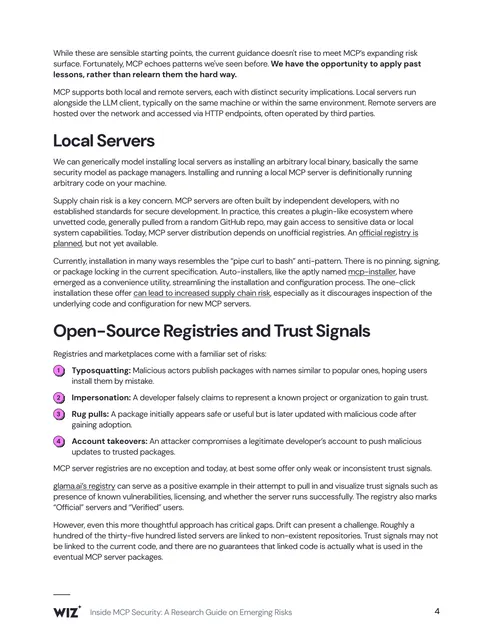
The starting point: a dense security brief
Wiz Research’s guide explains what the Model Context Protocol changes about an organization’s attack surface: local and remote servers, unofficial registries and their trust signals, client features such as auto-run, and how to use and build servers safely now and later. In print it is nine pages of tight prose, lists and a few figures. Every risk it names is a sequence of events, and a sequence is hard to see on a static page.
The brief
Security teams read guidance like this to decide what to change on Monday. The edition had to make each risk concrete without adding claims the guide doesn’t make.
Show the risk happening
Turn descriptions of injection, auto-run and tool-name conflicts into short simulations the reader can run, pause and replay.
Let readers practise
Give developers something to do: inspect a listing, flag lines in a code review, tick the controls they already have.
Keep the research exact
The guide’s text, numbers and 22 references stay as published, with page numbers. Everything added is marked as illustrative or editorial.
Who it is for
Security leaders, platform engineers and developers adopting AI agents that connect to tools through MCP.
Security leaders
Read the Quick track’s risk map and chapter gists, then use the hardening checklist to see where their controls stand.
Developers
Use the Deep track’s editor’s deep dives on trust signals, auto-run, transport and auth, and the code review.
Platform teams
Compare local and remote servers and see which emerging fixes close which of the earlier risks.
From PDF to edition, chapter by chapter
Each chapter shows its page range in the original guide.
| Chapter | The guide’s point | In the interactive edition |
|---|---|---|
| Introduction | What MCP is and why it matters for security | A read-aloud introduction and a choice of Quick or Deep-dive track |
| 1 · New technology, old risks (pp. 3–4) | MCP repeats risks defenders have seen before | A traced tool call through model, client, server and tool; a matching game pairing MCP patterns with their older equivalents |
| 2 · Local servers and registries (pp. 4–5) | Installing a local server runs arbitrary code; registries carry familiar supply-chain risks | One-click install compared with inspecting first; registry-drift odds from the guide’s figures; a listing whose trust badges can be inspected |
| 3 · Remote servers and clients (pp. 5–6) | Remote servers bring auth and transport risks; client features such as auto-run widen the impact | A local-versus-remote risk switch, a 12-second auto-run chain and a tool-namespacing demo |
| 4 · Secure yourself today (pp. 6–7) | How to use and how to write servers safely | A nine-control hardening checklist with a blast-radius diagram and a code review of a deliberately flawed server |
| 5 · Secure yourself tomorrow (p. 8) | Developments that could close today’s gaps | Pick the developments you’re watching and see which earlier risks they cover |
| Checkpoint and references (p. 9) | The 22 sources behind the guide | Five questions with instant feedback, every reference plus the links in the text, and a readout of the reader’s answers |
What Studio Vektor did
Kept Wiz’s guidance intact and built a hands-on layer around it.
Turned descriptions into simulations
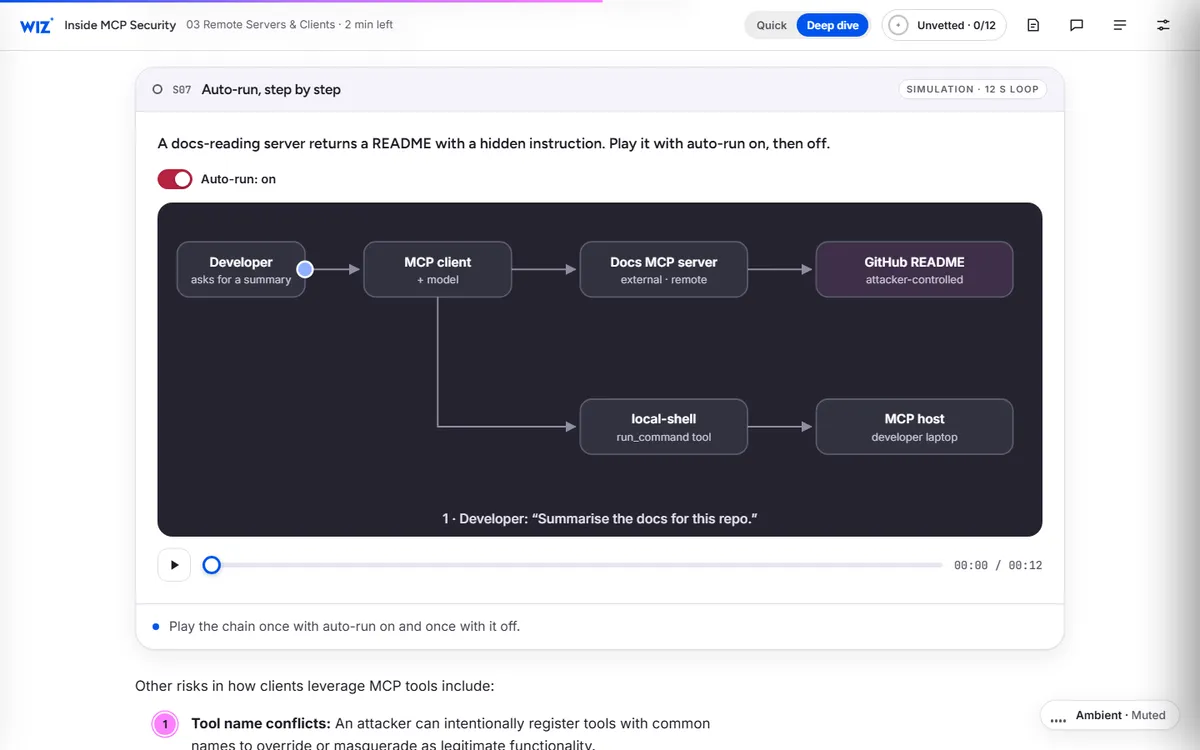
The auto-run attack, where a README hides an instruction that a client then runs, plays as a 12-second loop with auto-run on and off, so the reader sees exactly where approval would have stopped it.
Made the reader the reviewer
A made-up MCP server with three classic bugs asks the reader to click the lines they would flag, then shows the fixed version beside it.
Put the guide’s numbers to work
The guide’s count of registry listings that point to repositories that don’t exist becomes a small probability tool: install ten servers and see the chance that one has no code behind it.
Added a progress model
Each signal lit moves the reader through five stages, from Unvetted to Gateway-governed, shown in the header as they read.
The 12 signals
Each interaction lights a “signal”. The readout at the end lists what the reader did and can be copied into a ticket or a message.
| Signal | Type | What the reader does |
|---|---|---|
| 01 · Trace a tool call | Animated diagram | Picks one of five requests and watches it travel from the model to a server’s tool, then sees where the risk lives (p. 3) |
| 02 · Old risks, new protocol | Matching | Pairs six MCP patterns with the older patterns the guide says they echo |
| 03 · Install inspector | Terminal demo | Installs the same fictional server by one click and by inspecting first, and sees what one-click hides |
| 04 · Registry drift | Probability tool | Sets how many servers they install and sees the chance one links to a repository that doesn’t exist, using the guide’s figures |
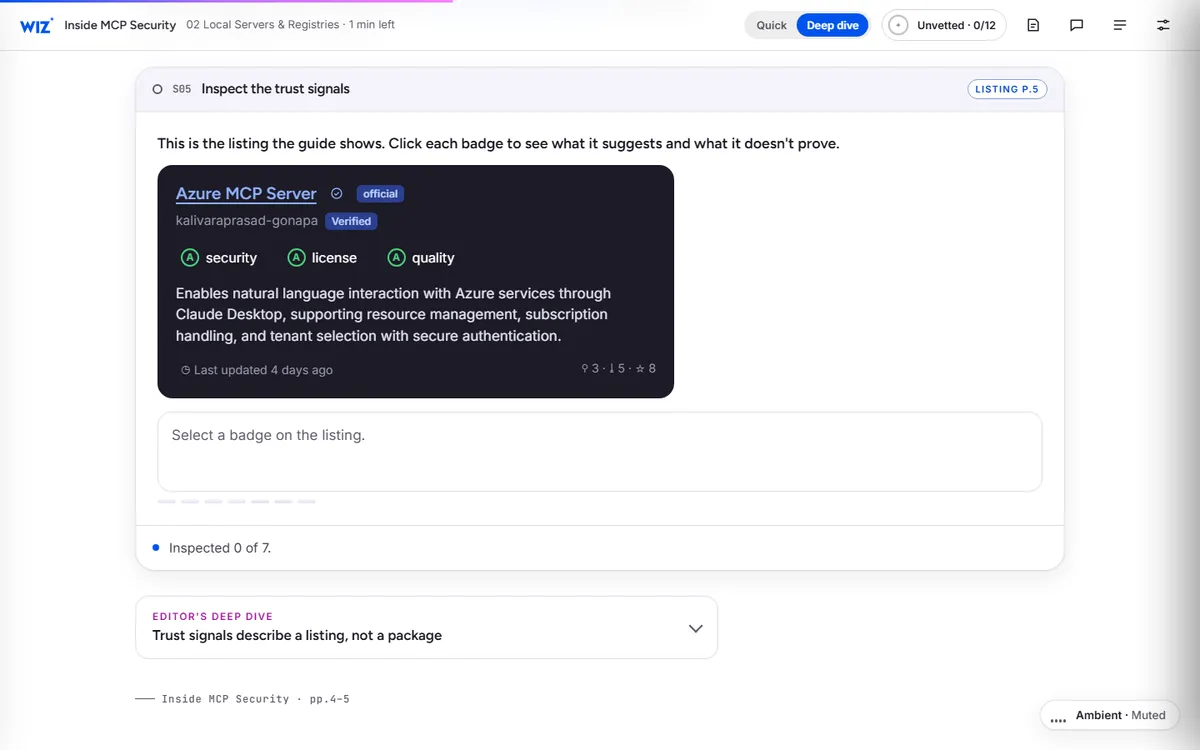
| 05 · Trust signals | Inspect | Clicks each badge on the guide’s example listing (p. 5) |
| 06 · Local vs. remote | Comparison | Switches the server type and compares the risk profile |
| 07 · Auto-run chain | 12-second simulation | Plays an injected instruction through a client with auto-run on and off |
| 08 · Who answers /deploy? | Scenario | Runs commands with two servers installed, then turns on namespacing and runs them again |
| 09 · Hardening plan | Checklist | Ticks nine controls and watches each shrink the part of the blast radius it covers |
| 10 · Spot the injection | Code review | Flags the lines with three classic bugs in a made-up server, then checks against the fix |
| 11 · Tomorrow’s fixes | Coverage map | Picks the developments they’re watching and sees which of ten risks they address |
| 12 · Checkpoint quiz | Quiz | Answers five questions, each linked back to the page that answers it |
Reading experience and accessibility
Nine dense pages become one responsive edition that can be skimmed in minutes or read in depth.
Two tracks
The Quick track gives a 30-second summary per chapter, the key lists and every interactive; the Deep-dive track adds every paragraph and the editor’s deep dives.
Listen along
Read-aloud with sentence tracking, previous and next sentence controls and speeds from 0.8× to 1.5×, using the reader’s device voice.
Reading settings
Text size, Auto, Light, Dark and Sepia themes, dyslexia-friendly type, bionic emphasis, margin notes and a calm-motion switch.
Announced results
Eighteen live regions announce widget results and quiz feedback as they change.
Every source a click away
All 22 references and the guide’s in-text links are kept and listed at the end.
Print and share
A print stylesheet, a readout to copy and progress saved in the browser.
Design system
Wiz’s dark night palette and electric blue and pink carry into the edition, with a code-editor look for anything technical.
- Night
#25242FCover and dark panels - Wiz blue
#0254ECActions and selections - Pink
#FC80FFBrand accent and highlights - Lavender
#BD75FASecondary accent - Navy
#01123FDeep backgrounds - Status
#11734B → #B4233ESafe, caution and risk states
Type
Figtree for display and reading, JetBrains Mono for code, terminals and page references, and Atkinson Hyperlegible for the dyslexia-friendly mode.
Labelled honesty
Every interactive carries a tag such as “From the guide”, “Illustrative” or “Guide figure + arithmetic”, so readers know what is Wiz’s and what is a demonstration.
Code that looks like code
Terminals, logs and server source use a dark editor style, so the security examples read like the tools developers use.
How it’s built
A guide in a fast-moving field needs to be easy to update as the specification changes.
| Aspect | Approach |
|---|---|
| Delivery | One self-contained HTML file (about 225 KB) with its images embedded. No platform, plugin or reader app. |
| External requests | Only the web fonts, with system-font fallbacks |
| Simulations | HTML and SVG animations driven by short scripts, with play, pause and scrub controls; calm motion shows each end state instead |
| Narration | The reader’s device voice through the Web Speech API, with sentence tracking |
| State | Signals, progress and settings saved in the reader’s browser; nothing is sent to a server |
PDF vs interactive edition
The PDF is the citable guide. The edition is where a team works through it.
| Question | Original PDF | Interactive edition |
|---|---|---|
| How does an auto-run attack unfold? | A paragraph and a code snippet | A 12-second chain to play with auto-run on and off |
| What do registry badges prove? | A screenshot of one listing | Each badge explains itself when clicked |
| Would I catch these bugs? | A list of vulnerability types | A code review where the reader flags the lines |
| How exposed are we? | A list of recommendations | A checklist that shrinks the blast radius as controls are ticked |
| Can I take something away? | The whole PDF | A readout of the reader’s answers to copy |
What we would measure
This edition is an independent demonstration with no audience data, and we don’t report results for it. For a security vendor, the signals show where each reader stands.
Control maturity
Which of the nine controls readers tick shows where the audience is exposed and which product conversation fits.
Engagement depth
Track choice, simulations played and the stage reached, from Unvetted to Gateway-governed.
Intent
Quiz completion, copied readouts and clicks from the closing section to the publisher’s site.
Where this approach fits
Technical guidance gains the most when readers can try the thing being explained.
Security research
Threat reports and attack write-ups, where a simulation shows the chain of events.
Developer guides
Best-practice guides where a code review or a checklist turns advice into practice.
Technical white papers
Architecture papers where an animated diagram replaces a paragraph of explanation.
FAQ
Common questions about this edition and projects like it.
Was this edition commissioned by Wiz?
No. It is an independent portfolio demonstration built from a guide Wiz published. The research is Wiz’s; the editorial layer, interactions, design and build are Studio Vektor’s.
Are the attacks in the simulations real?
They follow patterns the guide describes, but the servers, commands and code are fictional and run only as animations in the page. Nothing executes on the reader’s machine.
What would an edition like this cost?
Interactive eBooks start from $635, and the Advanced package with one defined quiz or scoring tool and interactive charts starts from $1,170. An edition at this depth, with twelve signals and several simulations, goes beyond those packages and is quoted on scope after we see your guide.
Can it be updated as the specification changes?
Yes. Each chapter and interaction is a separate block, so a changed recommendation or a new risk can be edited without rebuilding the rest.
Publishing technical research?
Let readers try what your guide explains.
Security research, developer guides and technical white papers all work well. Send the PDF and we’ll show you how.