

- Studio Vektor
- Interactive eBooks
- Contentsquare: The Agentic Web Playbook
Case study · Interactive playbook
The Agentic Web Playbook, an edition built for humans and agents
Contentsquare’s playbook explains how to prepare websites for AI agents. The interactive edition lets readers see a product page the way an agent does, send an agent through a checkout full of barriers and set how much authority agents get.

- Publisher
- Contentsquare
- Original format
- 16-page landscape PDF playbook
- Edition
- 6 steps, simulations, a 30-day plan
- Status
- Independent portfolio demonstration
An interactive edition of a playbook Contentsquare published. The playbook’s text and figures are as published; the gists, editor’s reflections, simulations, quiz and plan layout were written for this edition by Studio Vektor. Not commissioned by, affiliated with or endorsed by Contentsquare. The product page, store and policies in the simulations are fictional.

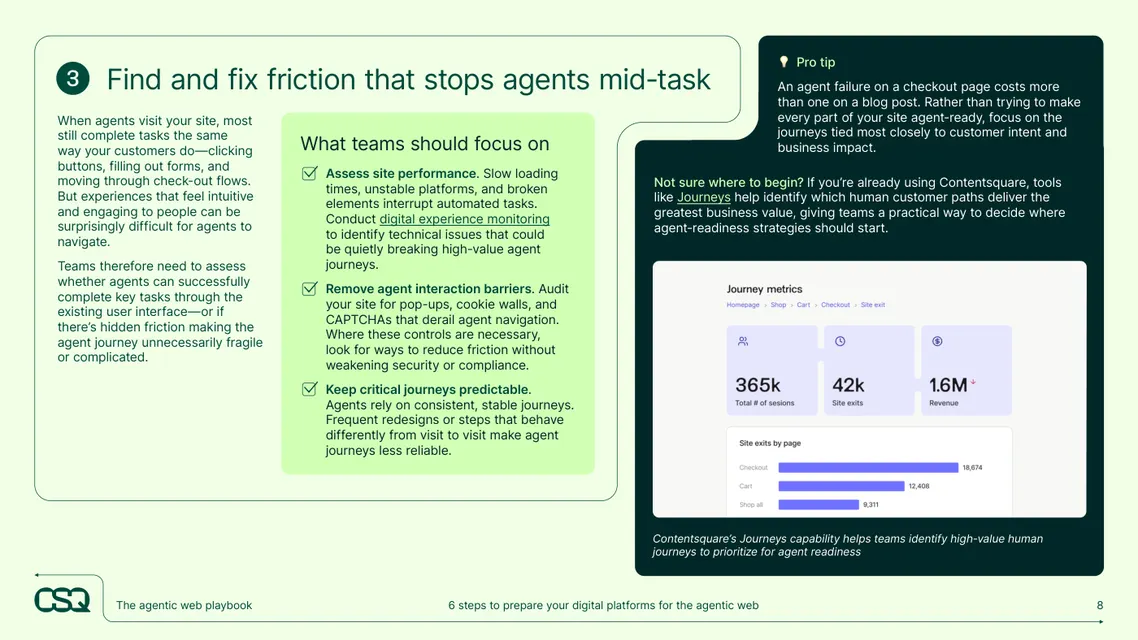
The starting point: a six-step playbook
The playbook describes the agentic web, where AI agents research, decide and act for users, and sets out six steps to prepare: assess your AI baseline, make information easy for agents to understand, fix friction that stops agents, decide how agents connect, protect the human experience and make readiness a shared priority. In print it is 16 widescreen pages, and the agent’s point of view is described rather than shown.
The brief
Agent readiness is hard to imagine from the outside. The edition had to put readers in the agent’s seat.
Show the agent’s view
Let readers switch a product page between the human view and what an agent reads.
Simulate the journey
Send an agent through a store with the barriers the reader’s own site has.
Make policy concrete
Turn authority and approval thresholds into settings with visible consequences.
Who it is for
Digital, ecommerce, product and engineering leaders preparing sites for AI agents.
Ecommerce leaders
See which product-page fixes raise AI visibility.
Product and engineering
Run the agent simulator and compare agent protocols.
Digital leadership
Take the Quick track, the quiz and the 30-day plan.
From PDF to edition, chapter by chapter
The edition keeps the playbook’s six steps in order.
| Chapter | The playbook’s point | In the interactive edition |
|---|---|---|
| Introduction | Your website has a new visitor, and it’s not human | Read-aloud with word or sentence tracking and an explainer of the agentic web |
| 1 · Assess your AI baseline | LLM-referred humans and bot traffic are measurable now | A baseline exercise that treats AI as its own channel |
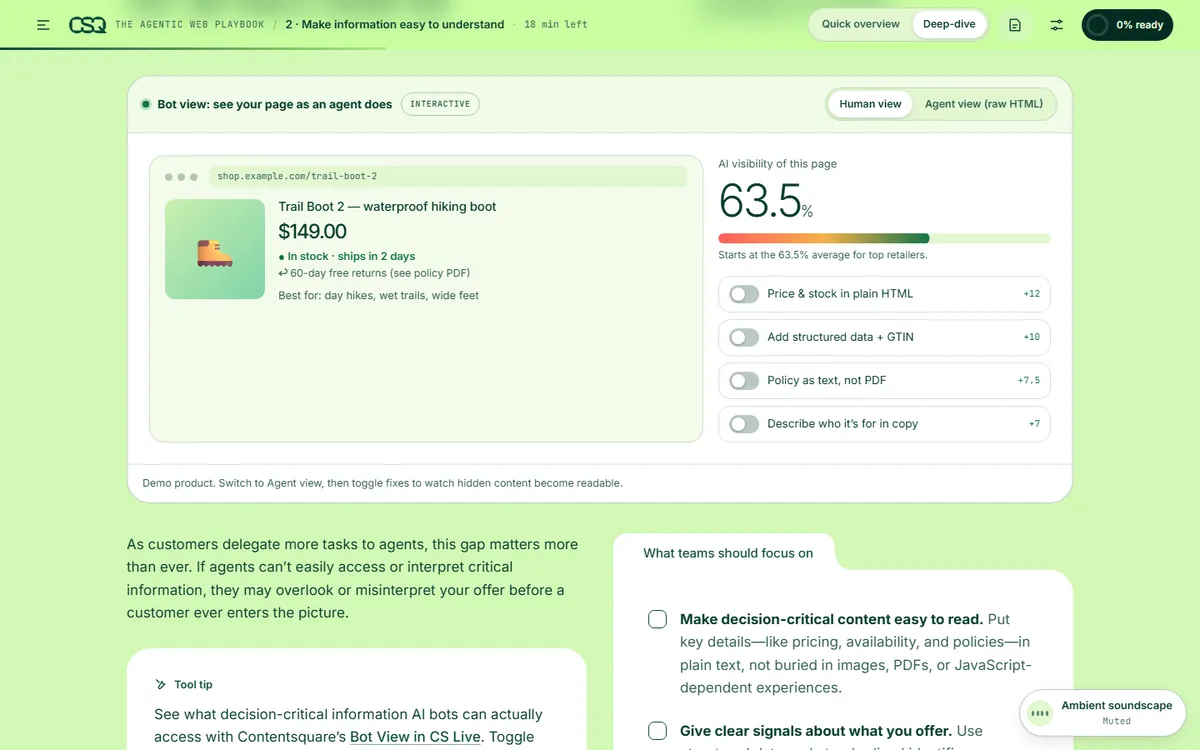
| 2 · Make information easy to understand | Top retailers’ product pages score 63.5% for AI visibility | A product page with a human view and an agent view, and fixes that raise its score |
| 3 · Find and fix friction | Intuitive experiences can stop agents mid-task | An agent-run simulator with pop-ups, slow loads, cookie walls and CAPTCHAs |
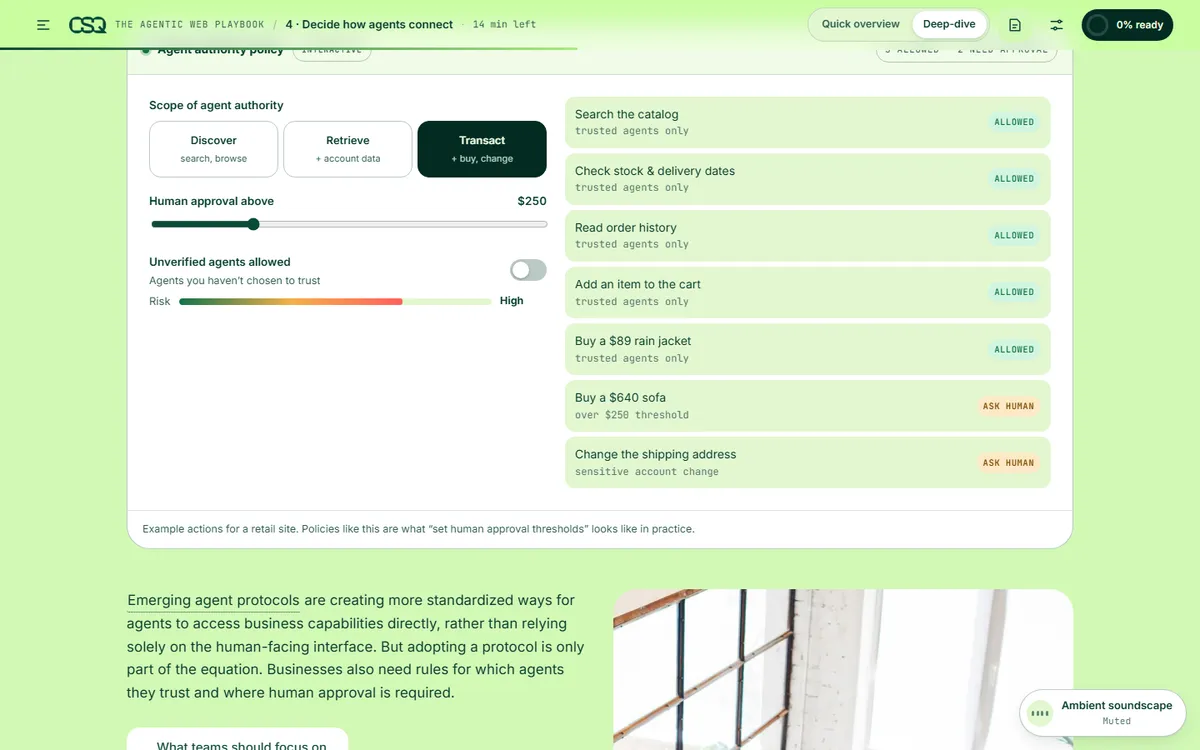
| 4 · Decide how agents connect | Set the scope of agent authority; know the four key protocols | An agent-authority policy with an approval threshold, and protocol cards |
| 5 · Protect the human experience | Agent readiness should complement the user experience | Guidance on keeping human journeys intact |
| 6 · Make it a shared priority | Agent readiness spans teams | Who owns what, a note on WebMCP, a five-question quiz and four quick wins for the next 30 days |
What Studio Vektor did
Built the edition so readers experience the agent’s side of the web.
Showed the agent view
A fictional product page switches to its raw HTML view; toggles for plain-text price and stock, structured data, policy text and audience copy each raise its AI visibility score.
Simulated the run
Readers add the barriers their site has, then send an agent to buy a product and see where it fails.
Made authority a setting
Discover, retrieve or transact scope, a human-approval threshold and a switch for unverified agents decide which example actions are allowed.
Practised what it teaches
The edition is structured, readable markup itself, with reading tracks and personalization that mirror the playbook’s advice.
Key interactives
All six interactive tools stay on in both reading tracks.
| Interactive | Type | What the reader does |
|---|---|---|
| Assess your baseline | Exercise | Treats AI as its own channel and notes what can’t be tracked yet |
| Bot view | Toggle | Switches between human and agent views and applies fixes to raise AI visibility |
| Agent run simulator | Simulation | Adds barriers and sends an agent to buy a product |
| Agent authority policy | Settings | Sets scope and an approval threshold and sees which actions are allowed |
| 4 key agent protocols | Cards | Compares the protocols for connecting AI to business systems and purchases |
| Five questions before you act | Quiz | Checks the playbook’s main ideas |
| 4 quick wins in 30 days | Plan | Works through a week-by-week plan of first steps |
Reading experience and accessibility
Sixteen widescreen pages become one responsive playbook that adapts to the reader.
Two tracks
Quick overview gives a one-glance gist for every step with all six tools; Deep-dive adds tool tips, protocols and implementation detail.
Listen along
Read-aloud with word or sentence tracking at 0.8× to 1.3×, using the reader’s device voice.
Reading settings
Text size, Auto, Light, Dark and Sepia themes, dyslexia-friendly type (Atkinson Hyperlegible) and bionic emphasis. Shorter line lengths are available too.
Discussion
Sample discussion threads, written for this edition; replies stay on the device.
Announced results
Seven live regions announce simulation and quiz results.
A print stylesheet for the full playbook.
Design system
Contentsquare’s deep forest green with a bright lime, plus coral for anything that blocks an agent.
- Forest
#0E3328Grounds and panels - Lime
#A6EE7EActions, selections and progress - Coral
#FF7A72Barriers and blocked actions - Amber
#F5B04AActions that need a human - Green
#6BDC9DAllowed actions and correct answers
Type
Inter Tight for display, Inter for reading, JetBrains Mono for code and agent views, and Atkinson Hyperlegible for the dyslexia-friendly mode.
Allowed, ask, blocked
Green, amber and coral mean the same thing in every simulation.
Fictional by design
The store, product and policies are fictional and labelled as demonstrations.
How it’s built
Simulations are self-contained, so new barriers, protocols or actions can be added as standards develop.
| Aspect | Approach |
|---|---|
| Delivery | One self-contained HTML file (about 1.3 MB) with its images embedded. No platform, plugin or reader app. |
| External requests | The web fonts, with system-font fallbacks, and a page-view analytics tag |
| Narration | The reader’s device voice through the Web Speech API, with word or sentence tracking |
| State | Answers, progress and settings saved in the reader’s browser |
PDF vs interactive edition
The PDF explains the agent’s view. The edition shows it.
| Question | Original PDF | Interactive edition |
|---|---|---|
| What does an agent see on our page? | A description and a statistic | A page that switches to the agent view |
| Where do agents get stuck? | A list of friction points | A simulator with the reader’s own barriers |
| How much authority should agents get? | Guidance | A policy with visible consequences |
| What do we do first? | Four quick wins | A week-by-week 30-day plan |
What we would measure
This edition is an independent demonstration with no audience data, and we don’t report results for it. For an experience-analytics company, readers’ settings show how far along they are.
Readiness
Which fixes and barriers readers toggle.
Risk appetite
The scope and approval thresholds they choose.
Intent
Quiz completion, plan views and clicks to the vendor’s site.
Where this approach fits
Content about a new kind of user benefits from showing that user’s point of view.
Emerging-tech playbooks
Simulations of behavior readers can’t yet observe.
Technical guidance
Settings that show the consequence of each choice.
Digital-experience content
Editions that follow their own advice.
FAQ
Common questions about this edition and projects like it.
Was this edition commissioned by Contentsquare?
No. It is an independent portfolio demonstration built from a playbook Contentsquare published. The playbook is Contentsquare’s; the editorial layer, interactions, design and build are Studio Vektor’s.
Is the agent in the simulator real?
No. It is an animation of the behaviors the playbook describes, run against a fictional store.
What would an edition like this cost?
Interactive eBooks start from $635, and the Advanced package with one defined quiz or scoring tool and interactive charts starts from $1,170. An edition at this depth, with an agent view, a simulator and policy settings, goes beyond those packages and is quoted on scope after we see your document.
Can it keep up as standards change?
Yes. Protocols, barriers and actions are data in the page, so they can be updated as standards such as WebMCP develop.
Publishing about a fast-moving shift?
Show readers what the change looks like from the inside.
Emerging-technology playbooks and technical guides work well. Send the PDF and we’ll show you how.